Temporary phone numbers may work for Apple Account verification, but success is not guaranteed.
To complete verification, a number must actively receive SMS messages or automated phone calls at signup. Beyond initial setup, however, a critical distinction exists between receiving a single activation code and retaining access for ongoing account security.
Apple explicitly recommends using a phone number you can continuously access when creating an Apple Account. While temporary numbers suffice for short-term testing, long-term or primary accounts demand persistent access to prevent lockouts.
This guide details how temporary numbers function within Apple’s authentication system, when they work, potential failure points, and reliable alternatives.
How Apple Uses Phone Numbers
Apple Accounts rely on phone numbers for initial verification and ongoing security.
During account creation, Apple requires phone number verification. For accounts using two-factor authentication (2FA), Apple demands at least one trusted phone number to receive login codes on new devices or browsers.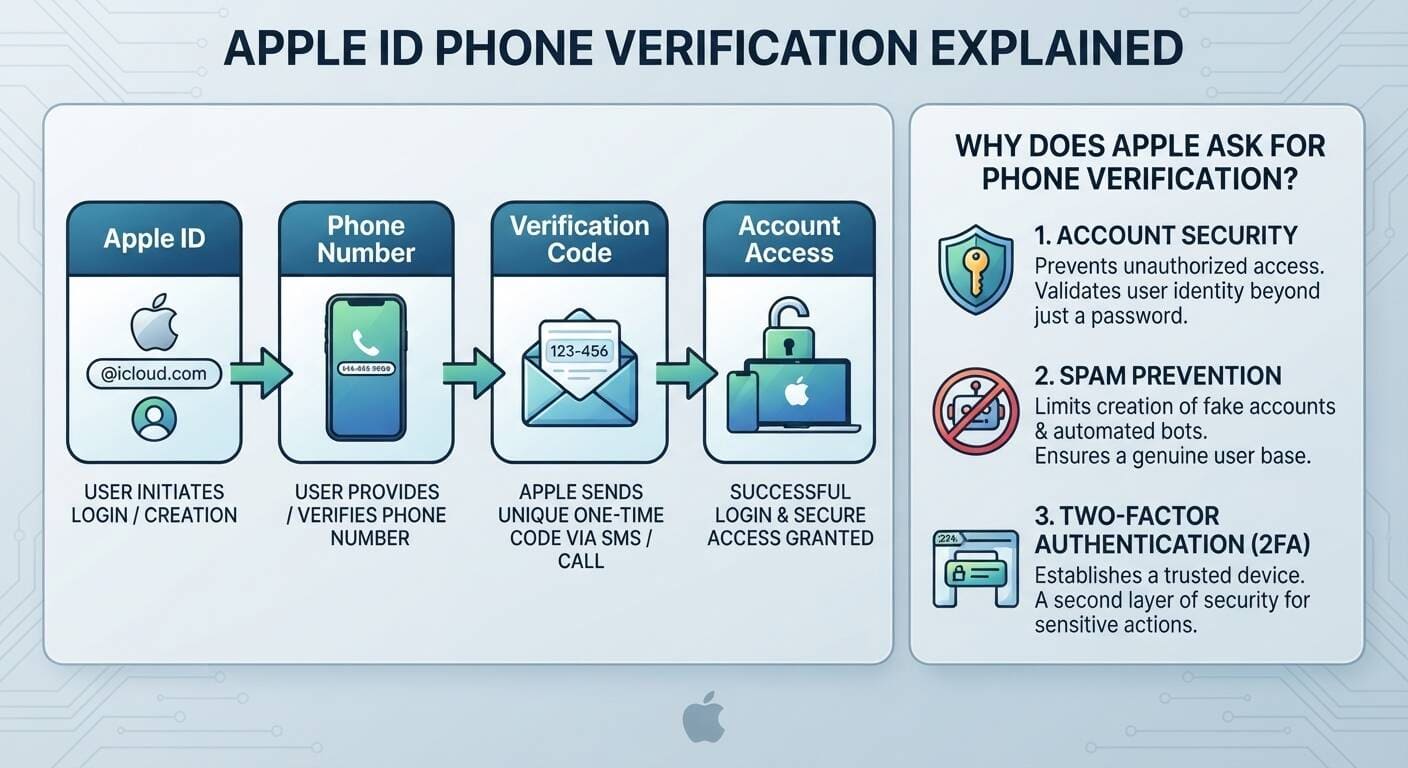
Why Security Architectures Mandate Phone Verification
Beyond basic access control, phone verification functions as a core structural defense:
- Identity Validation: Adds a physical device barrier beyond standard password credentials to prevent unauthorized account access.
- Automated Bot Suppression: Prevents malicious actors and automated scripts from bulk-registering spam accounts.
- Second-Factor Trust Base: Establishes an anchor for Two-Factor Authentication (2FA) required during sensitive operations like credential updates or payment modifications.
Because of this security model, a phone number remains essential long after initial registration.
Can a Temporary Number Receive an Apple Verification Code?
Sometimes—provided the number can accept incoming SMS messages or phone calls when Apple sends the code.
However, Apple does not publish an official whitelist of accepted temporary, virtual, or VoIP providers. Avoid absolute claims such as:
- "All temporary numbers work with Apple."
- "Apple accepts every virtual number."
- "Apple blocks all VoIP numbers."
No official documentation supports these statements. As discussed in Apple Support Discussions regarding verification numbers, the practical test remains simple: Can the specific number receive Apple's verification dispatch at that exact moment?
Types of Alternative Numbers
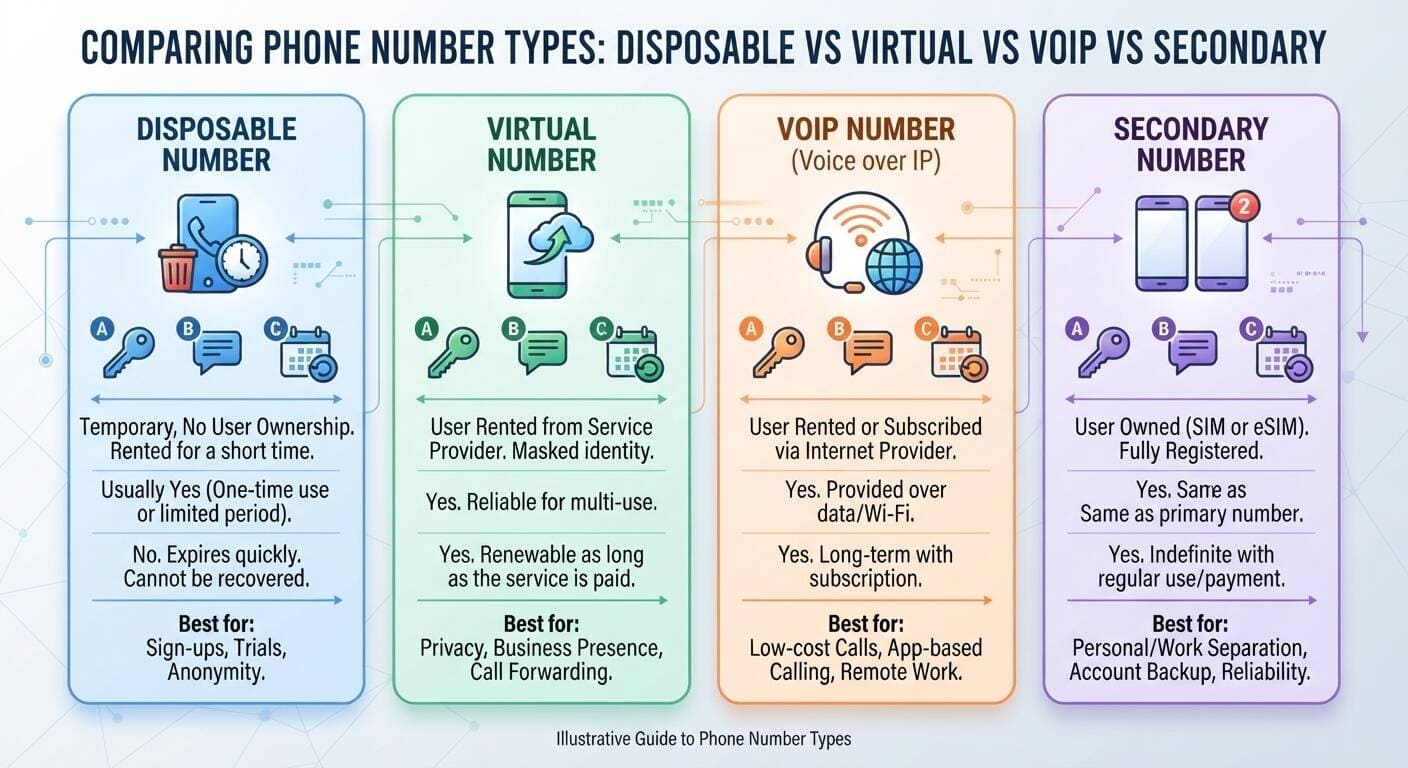
Evaluating Telecommunication Technologies
Understanding the underlying service architecture helps predict whether a non-traditional number will pass Apple’s carrier checks:
- Disposable Numbers: Temporary, non-owned lines rented for short periods. Ideal for immediate, single-use trial signups, but fast expiration means these numbers cannot be recovered for future verification requests.
- Virtual Numbers: Cloud-provisioned numbers rented through internet platforms. While useful for long-term business privacy and call forwarding, compatibility depends on how individual carriers route incoming short-code SMS messages.
- VoIP Numbers: Internet-protocol voice lines supplied via data connections or apps. Suitable for low-cost communications and remote work, but automated security filters frequently flag or decline VoIP blocks during multi-factor authentication.
- Secondary Mobile Numbers: Fully owned physical SIM or eSIM subscriptions. Functioning identically to a primary line, these offer long-term stability and full recovery rights while separating work or backup usage from personal channels.
Temporary Numbers vs. Long-Term Security Strategies
When evaluating a temporary or alternative number for an Apple Account, short-term benefits must be weighed against operational risks and mitigated with proper strategy:
- New Account Signups: Temporary lines allow immediate access prior to establishing permanent numbers, but carry high recycling risks where the number is reassigned to another user. Fix: Immediately add a backup 2FA method or dedicated device within account settings.
- Short-Term Testing & Evaluation: Hides primary personal credentials during disposable service trials, but creates severe data loss risks if the account becomes permanent. Fix: Migrate account data or transfer to a persistent number before storing sensitive files.
- Privacy & Spam Reduction: Prevents public number exposure, but poses reassign risks where future occupants could attempt credential recovery (a issue frequently highlighted by users on Reddit's r/Apple community). Fix: Utilize dedicated persistent web options or secondary SIMs rather than public disposable pools.
- One-Time SMS Verification: Simplifies immediate setup, but removes the ability to perform future security challenges due to zero recovery access. Fix: Discard the temporary number after setup and switch authentication entirely to trusted Apple hardware or secure backup numbers.
Why Temporary Numbers Fail
Verification requests fail when incoming messages or calls are blocked. Primary reasons include:
- Unsupported Messaging Formats: The provider cannot process short-code or automated security texts.
- Premature Expiration: The number lapses before you input the code.
- Access Loss: The service dashboard becomes unresponsive or loses session connectivity.
- Existing Account Linkage: Apple restricts reuse if a number is already linked to another Apple Account.
The Primary Risk: Ongoing Security Locks
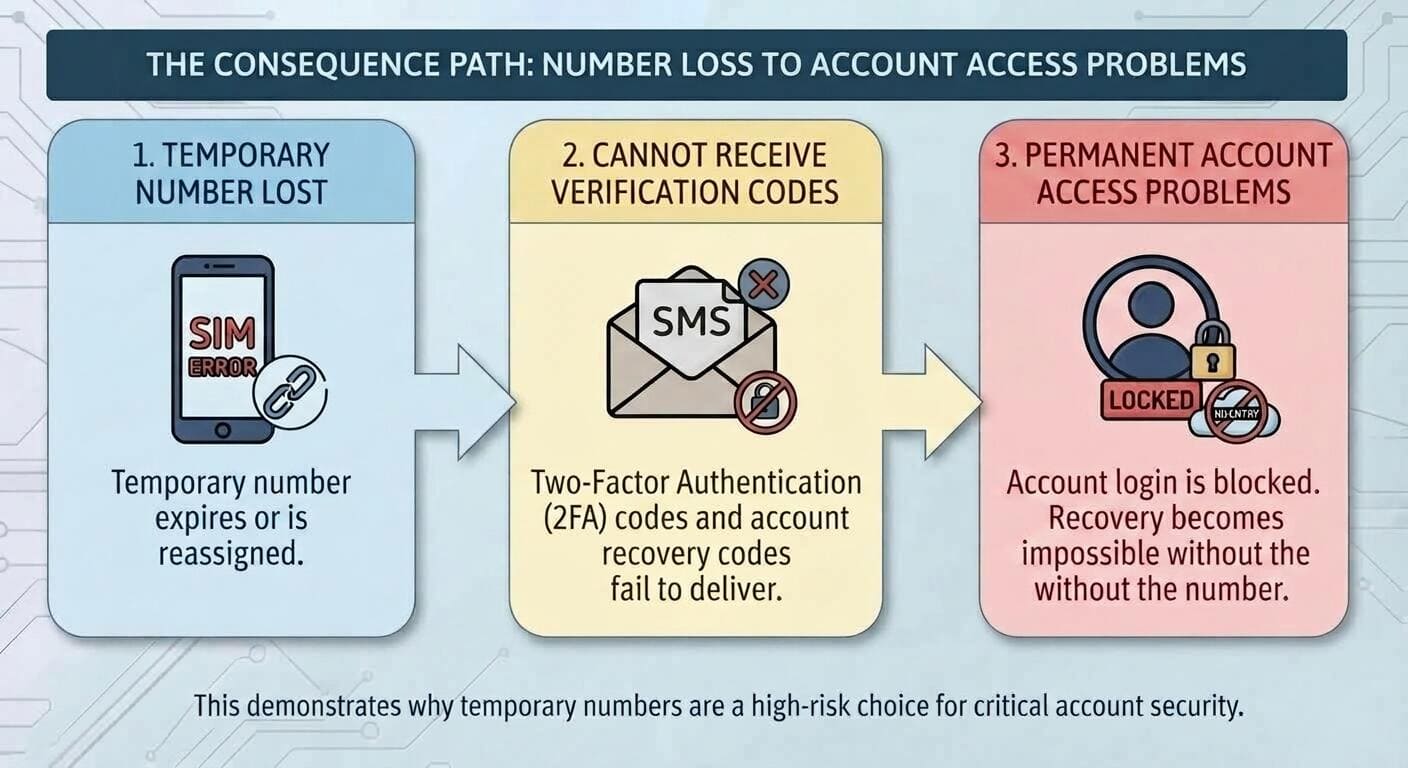
The Chain of Access Failure
- Number Expiration or Reassignment: The short-term vendor terminates the line or assigns it to a new customer.
- Delivery Failure of 2FA Challenges: Subsequent logins from new browsers, software updates, or device resets trigger automated 2FA challenges. Verification codes sent via SMS bounce or arrive at an inaccessible inbox.
- Permanent Access Block: Login halts completely. Without secondary trusted factors, account recovery becomes extremely difficult or impossible, locking access to purchases, iCloud backups, and connected services.
What Happens If You Lose Access to Your Number?
Losing a trusted number does not automatically cause permanent account loss, provided fallback options exist:
- Trusted Apple Devices: Signed-in iPhones, iPads, or Macs can display verification prompts natively.
- Additional Trusted Numbers: Apple allows multiple trusted numbers per account to prevent single points of failure.
- Account Recovery: Apple offers a manual recovery process, though account restoration can take several days or longer.
Comparing Options for Privacy and Control
Selecting the right setup depends on your performance, privacy, and long-term ownership requirements:
- Temporary Numbers: Rented, non-owned lines best suited for trial sign-ups, short-term testing, and complete anonymity. Offers limited or one-time SMS support with no long-term recovery pathway.
- eSIM Profiles: Digitally provisioned profiles on compatible smartphones. Ideal for international travel, dual-SIM flexibility, and maintaining a separate non-physical number with standard carrier SMS support.
- Secondary Mobile Lines: Physical SIM or dedicated long-term mobile contracts. Best for work-life balance, account backup redundancy, and permanent secondary authentication.
- Personal Primary Numbers: User-owned SIM/eSIM contracts intended for main communications, trusted contacts, and primary identity verification across banking and Apple services.
Long-Term Alternatives to Keep Your Primary Number Private
To protect your personal phone number without risking account access, consider these approaches:
- Activate an eSIM or Secondary SIM: Maintains full control over account recovery without sharing your primary contact number.
- Add Multiple Trusted Numbers: Register a secondary family member or backup line via Apple Account Sign-In & Security.
- Designate a Recovery Contact: Assign a trusted contact to assist with account restoration via secure recovery codes if access is lost.
Managing and Removing Phone Numbers
You can manage and update your phone numbers directly on the Apple Account Management Page. However, never remove a trusted line until you have designated an active replacement (or have immediate access to another trusted Apple device).
Frequently Asked Questions
Can I use a temporary number to create an Apple Account?
Yes, provided the line can receive Apple's immediate SMS or voice verification code. Apple does not guarantee compatibility for temporary services.
Does Apple accept virtual numbers?
Apple does not publish an explicit rule accepting or declining all virtual numbers. Acceptance depends on individual carrier configurations, as noted in various Apple Community Discussions.
Can I use a VoIP number for verification?
Some VoIP lines work, while others are flagged by security filters. VoIP status alone does not guarantee success.
What happens if my temporary number expires?
If Apple requests code verification and the number is inactive, authentication requires a trusted device, an additional trusted number, or account recovery.
Does Apple always require a phone number?
Yes. Apple requires an accessible phone number to complete account setup and enable two-factor authentication.
Can I add multiple phone numbers to my Apple Account?
Yes. Apple allows multiple trusted phone numbers for account security and recovery.
Final Recommendation
Use a temporary number only for disposable accounts or brief testing. For accounts holding valuable data, purchases, or iCloud backups, use a line you control long-term to ensure continuous account access.